Free · No sign-up · No ads
Study Tracker
A free study tracker that fills in your study log from the timer, the focus timer and the stopwatch, so there is nothing to type.
This week
0m
0 sessions · Nothing logged yet
Goal
0%
of your 15h weekly goal ·
Streak
0 days
Last 14 days · bestBest 0 days
Best day
—
No study yet
By subject
-
·
No study time in this period yet.
Last 12 weeks
· darker squares mean more study
Session log
No sessions in this period. Start the study timer or add a session by hand.
| Time | Subject | Length | Mode | Note | Actions | ||||||
|---|---|---|---|---|---|---|---|---|---|---|---|
| Incomplete | |||||||||||
-
-
Incomplete
-
Your log lives only in this browser.
Browsers can clear site data, especially Safari after a week away. No backup yet.
Your log is also saved in your account.
It syncs to your other devices. Download it or bring back an earlier version on the page of your account.
Importing merges a backup into this log: only newer changes replace what’s here.
01 How it works
How the study tracker works
See your hours in charts by day, week, month and subject, keep a streak going and export everything to CSV, with no sign-up and no ads. Your log is saved in this browser; export a backup anytime.
-
Study with the timer
Every session from the Pomodoro study timer, the focus timer and the stopwatch for studying is saved here with its subject. Nothing to fill in. New to studying in timed blocks? The Pomodoro technique for studying explains how long to focus and when to take a break.
-
Add the rest by hand
Studied at the library or in a group? Add a session with its date, start time and length.
-
Watch the totals
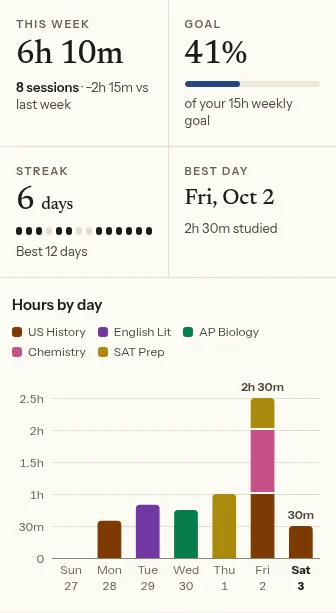
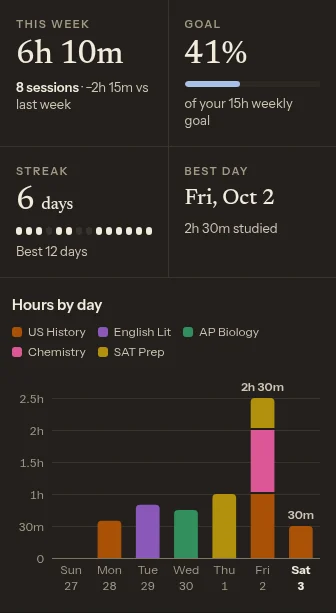
See your study hours by day, week and month, a split by subject, your streak and a 12-week map of every study day. Use them to plan your study week. Give the hours to the course that moves your GPA most: the GPA calculator shows which one.
-
Fix and back up
Use the pencil to fix a session’s subject, time, length or note. Export a backup now and then: your log lives only in this browser.
02 FAQ
Questions about the study tracker
How do I track my study hours?
Start the study timer, the focus timer or the stopwatch when you sit down: every session is saved here with its subject, start time and length. Add anything you studied away from the screen by hand. The tracker turns it into charts of your hours per day, week and month, a split by subject and a streak.
Is there anything to set up first?
No. There are no templates or dashboards to build: sessions from the timer and stopwatch show up here on their own. Add subjects when you need them, and change your goals only if you want to.
Where is my study log stored?
In this browser, on this device. Nothing is sent to a server. Export a backup to keep it safe or to move it to another device.
Can I edit or delete a session?
Yes. Use the pencil on any row to change its subject, time, length or note, or to delete it. A deleted session can be brought back right away with Undo.
Can I open my study log in Excel or Google Sheets?
Yes. Export CSV gives you one row per session with the date, start and end time, subject, minutes, mode, whether it was completed, and your note.
Is this study time tracker really free? What will be paid?
Charts, history, streaks and CSV export are all free, with no account and no ads. Study Tally Pro will add cloud backup and sync across devices, free during early access; the tracker itself stays free.
03 Contents
More tools for studying
- Study Timer
- Focus Timer
- Break Timer
- Reading Timer
- Study Stopwatch
- Aesthetic Study Timer
- Flip Clock
- Minimalist Timer
- Fullscreen Timer
- ADHD Timer
- Visual Timer
- AP Exam Timer
- SAT Timer
- Exam Timer
- Study Planner
- Time Blocking Planner
- Homework Planner
- Exam Study Planner
- Weekly Study Planner
- Grade Calculator
- Final Grade Calculator
- GPA Calculator
- High School GPA Calculator
- Cumulative GPA Calculator
- The Pomodoro Technique
- Timer Widget